


In today’s digital age, safeguarding your privacy online is more important than ever. Modeland.ai offers innovative tools, including face-swapping technology, to help anonymize your appearance in photos and videos. This tutorial will guide you step-by-step on effectively using Modeland.ai’s features for privacy protection.
What is Face Swap Technology on Modeland.ai?
Face swapping involves replacing a person’s face in an image or video with another face, often generated by AI. Modeland.ai provides cutting-edge face swap solutions designed for privacy-conscious individuals and professionals. By swapping your face with a synthetic or unrelated face, you can share content online without revealing your identity while using the secure infrastructure of Modeland.ai.
Step 1: Sign Up and Access the Face Swap Tool
To get started, create an account on Modeland.ai if you haven’t done so already. Once logged in:
- Navigate to the Face Swap section in the tools menu.
- Familiarize yourself with the interface designed for ease of use and seamless integration.
Step 2: Prepare Your Images or Videos
Gather the media you want to anonymize. For the best results:
- Use high-quality images or videos.
- Ensure good lighting and clear visibility of faces.
- Avoid complex backgrounds or obstructions that might interfere with the face-swapping process.
Upload your media directly to the secure servers of Modeland.ai for processing.
Step 3: Choose or Generate a Replacement Face
Modeland.ai allows you to create an AI Model and use that face in your original content.
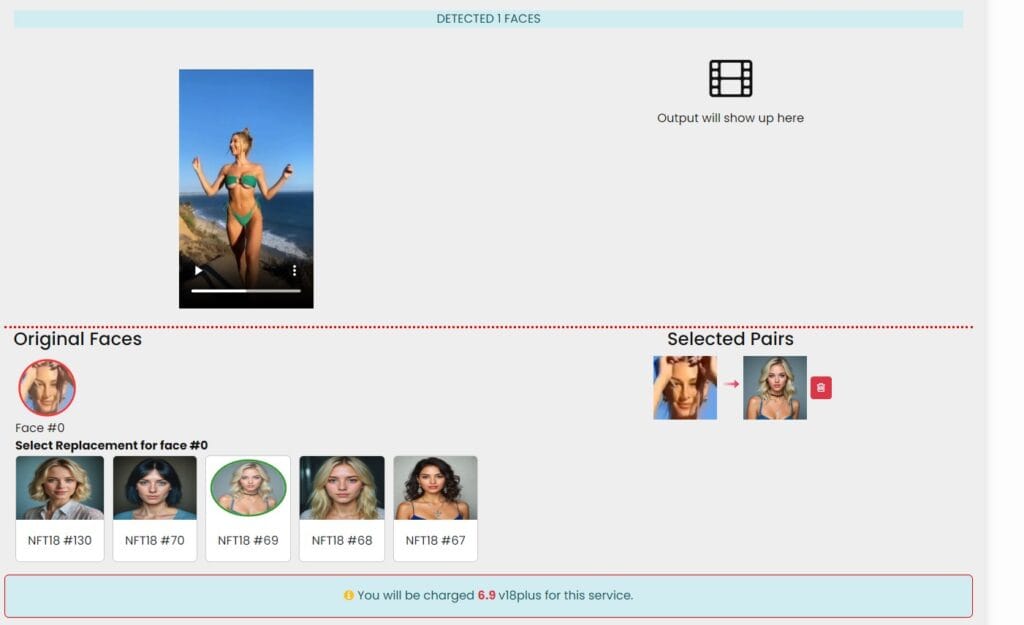
Step 4: Perform the Face Swap on Modeland.ai
Follow these steps to execute the face swap:
- Upload Your Media: Use the drag-and-drop feature to upload your image or video.
- Select the Replacement Face: Choose a face from your model.
- Apply the Swap: Click the process button and let Modeland.ai’s AI handle the rest.
Step 5: Save and Share Your Anonymized Content
After editing, save the final version of your image or video securely on Modeland.ai. The platform allows direct downloads or sharing links, ensuring your data remains private. When sharing content:
- Double-check that metadata is removed.
- Ensure the swapped face fully anonymizes your identity.
Privacy Considerations with Modeland.ai
Modeland.ai prioritizes user security and ethical use. Key privacy features include:
- Data Encryption: All uploads and downloads are encrypted.
- No Retention Policy: Your media is deleted after processing unless you choose to save it.
- Ethical AI Practices: The platform is designed to prevent the misuse of face-swapping technology.
The face-swapping technology on Modeland.ai offers a robust and secure solution for protecting your privacy. By following this step-by-step guide, you can confidently anonymize your appearance in photos and videos while taking advantage of Modeland.ai’s cutting-edge tools. Explore the possibilities today and take control of your digital privacy!